| Scenario | Number of Layers | Total Depth (mm) | Mean Thickness (mm) | Min Thickness (mm) | Max Thickness (mm) |
|---|---|---|---|---|---|
| Fine Resolution | 12 | 2500 | 208 | 50 | 500 |
| Standard | 7 | 2000 | 286 | 150 | 400 |
| Coarse Resolution | 5 | 2000 | 400 | 200 | 600 |
The ILayerStructure interface defines the fundamental layer-based structure for soil profiles in APSIM NG, providing the thickness of each soil layer that forms the basis for all layered soil properties and processes.
ILayerStructure is a core interface in APSIM NG that establishes the vertical discretization of the soil profile into distinct layers. This interface is essential for representing the three-dimensional nature of soil properties and processes in a one-dimensional framework, where vertical variation is explicitly modeled while horizontal variation is typically assumed uniform.
The interface defines a single but critical property: layer thickness. This serves as the foundational geometry upon which all other soil properties (physical, chemical, biological) are mapped. By implementing this interface, soil components and related models can consistently access and use the soil’s vertical structure for calculations involving water movement, nutrient transport, root growth, and microbial processes.
The layer-based approach allows APSIM NG to represent important vertical gradients in soil properties that significantly affect crop performance, such as:
This section lists the key variables that describe or control the behaviour of this component. Some variables can be adjusted by the user to modify how the model behaves (configurable), while others are calculated internally and can be viewed as model outputs (reportable). For a general explanation of variable types and how they are used within the APSIM Next Generation framework, see the Model Variables Overview.
Configurable and Reportable Properties
No configurable properties are available for this interface directly. Thickness values are set by implementing classes.
Read-Only Reportable Properties
| Property | Type | Description |
|---|---|---|
| Thickness | double[] | Soil layer thicknesses in millimeters (mm). An array where each element represents the vertical extent of a soil layer, typically starting from the soil surface and progressing downward. For example, [150, 150, 300, 300] represents four layers: 0-150 mm, 150-300 mm, 300-600 mm, and 600-900 mm depth. |
ILayerStructure is implemented by various soil component classes. The most common way to define soil layer structure is through the Physical node within a Soil component:
The layer structure should be carefully defined based on:
Common practices for defining layer thickness:
| Scenario | Number of Layers | Total Depth (mm) | Mean Thickness (mm) | Min Thickness (mm) | Max Thickness (mm) |
|---|---|---|---|---|---|
| Fine Resolution | 12 | 2500 | 208 | 50 | 500 |
| Standard | 7 | 2000 | 286 | 150 | 400 |
| Coarse Resolution | 5 | 2000 | 400 | 200 | 600 |
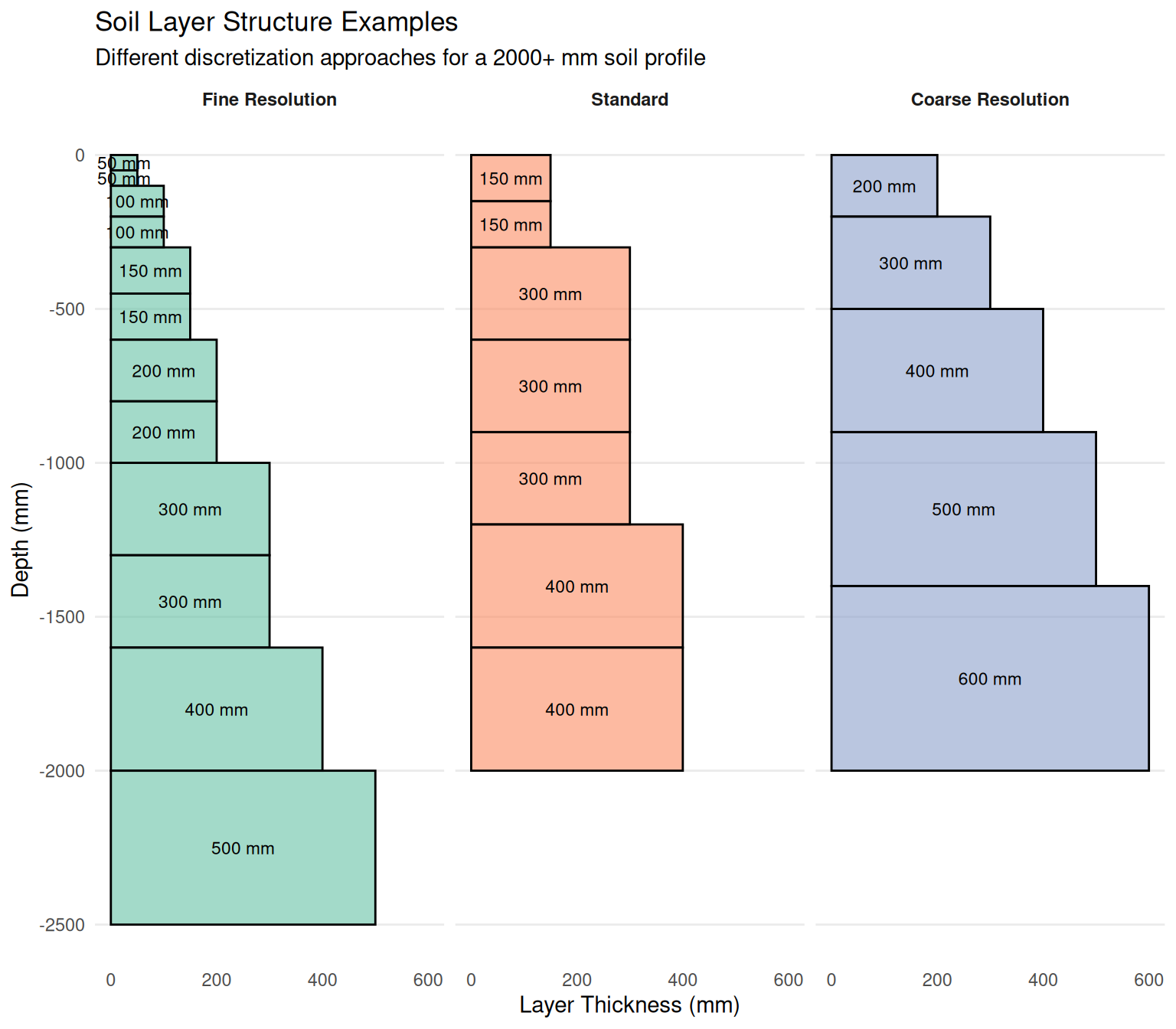
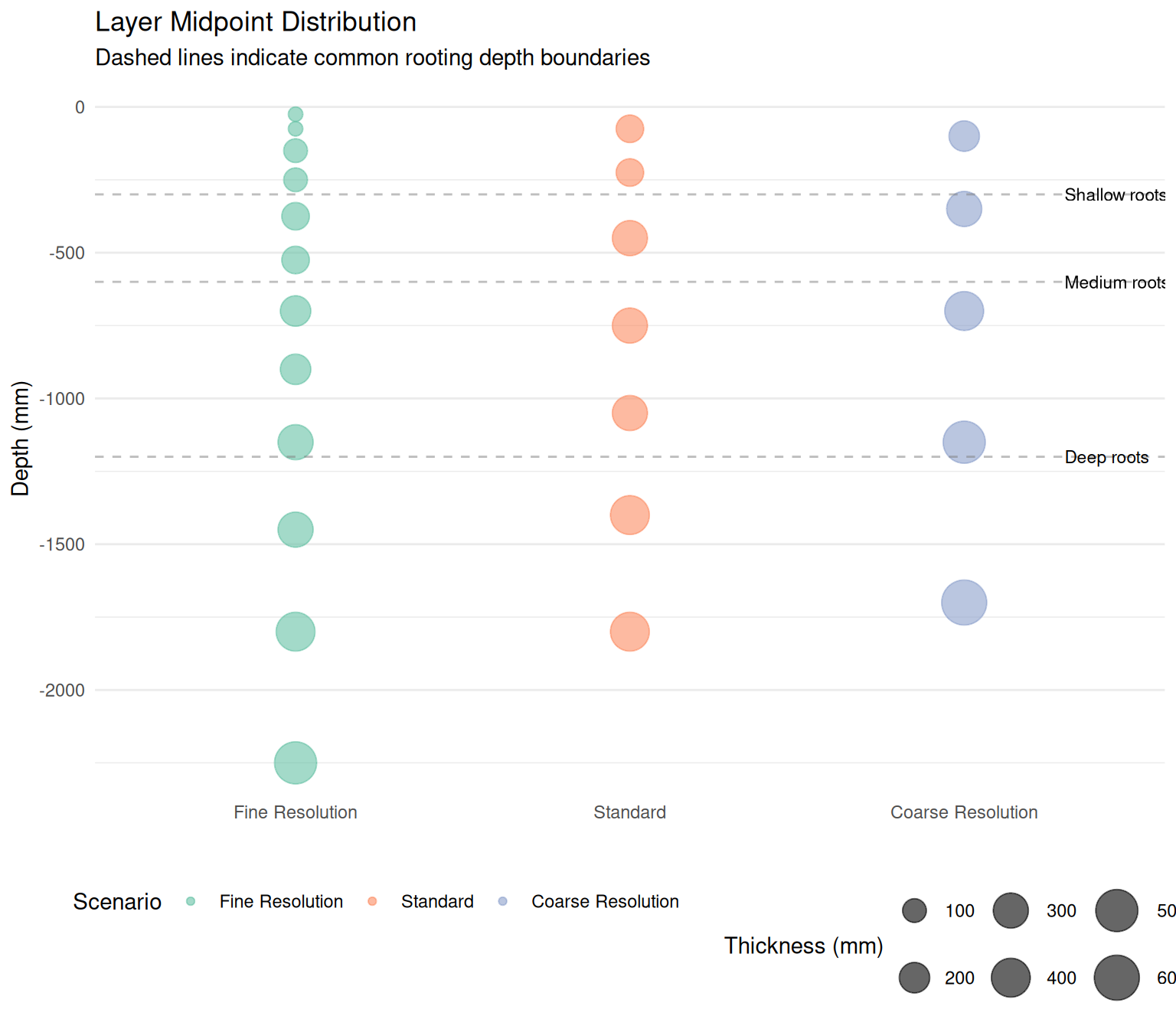
This example demonstrates three different approaches to discretizing a soil profile:
Fine Resolution: Uses 12 layers with thinner layers near the surface (50-100 mm) where soil properties and biological processes change rapidly. This approach provides high accuracy for modeling surface processes like infiltration, evaporation, and shallow root water uptake, but increases computational demand.
Standard: A balanced approach with 7 layers that captures the major vertical gradients while maintaining computational efficiency. The top two layers (150 mm each) represent the topsoil where most biological activity occurs, followed by progressively thicker layers with depth.
Coarse Resolution: Uses only 5 layers for computational efficiency. This might be suitable for deep-rooted crops in relatively uniform soils or for exploratory modeling where detailed vertical resolution is less critical.
The choice of layer structure depends on several factors:
Resolution considerations:
Mathematical representation:
The total soil depth is calculated as:
\[D_{total} = \sum_{i=1}^{n} T_i\]
where \(T_i\) is the thickness of layer \(i\) and \(n\) is the number of layers.
For any layer \(i\), the depth range is:
\[D_{top,i} = \sum_{j=1}^{i-1} T_j\]
\[D_{bottom,i} = \sum_{j=1}^{i} T_j\]
\[D_{mid,i} = \frac{D_{top,i} + D_{bottom,i}}{2}\]
These depth calculations are fundamental for:
Best practices: